✨ #1 Spotify Music & Playlist Downloader (v1.3.4)

The Ultimate Spotify Music Downloader & Playlist to MP3

Download entire Spotify playlists, albums, and tracks in crystal clear 320kbps MP3 audio directly to your Android phone. Ad-free, with a built-in offline music player. Purchase SpotSaver on Gumroad to get started.

Spotify to 320kbps MP3
Full Playlist Batch Download
Android 7.0+ (No Root)
🎧 Studio 320kbps MP3
⚡ Batch 51+ Tracks
SpotSaver Offline Music Player Android App Interface
📸 PROVEN IN ACTION

See SpotSaver in Action

Real, untouched screenshots from the standalone Android application. Fast, intuitive, and clean.

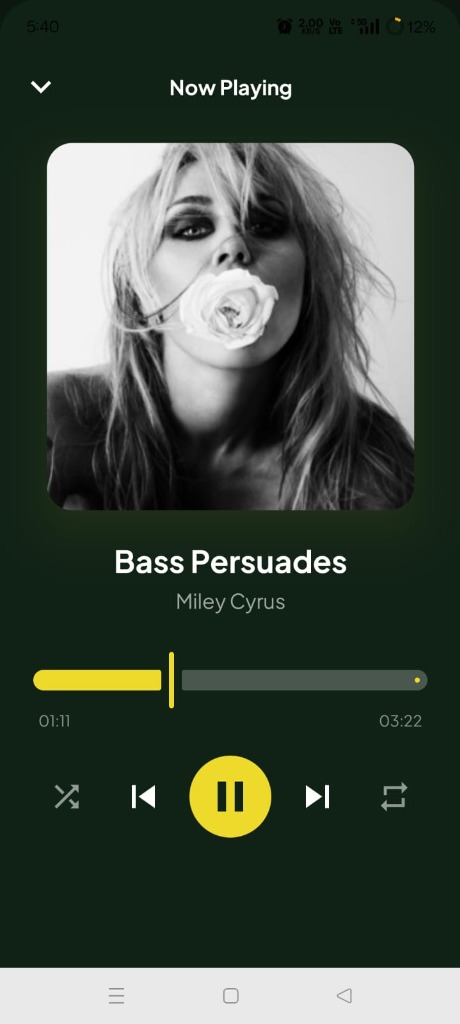
SpotSaver Built-In Offline Music Player
🔍 Tap to Zoom
1. Offline Player

Built-In Media Player

Listen to all your saved tracks offline with HD album art, scrub controls, and lock-screen playback.

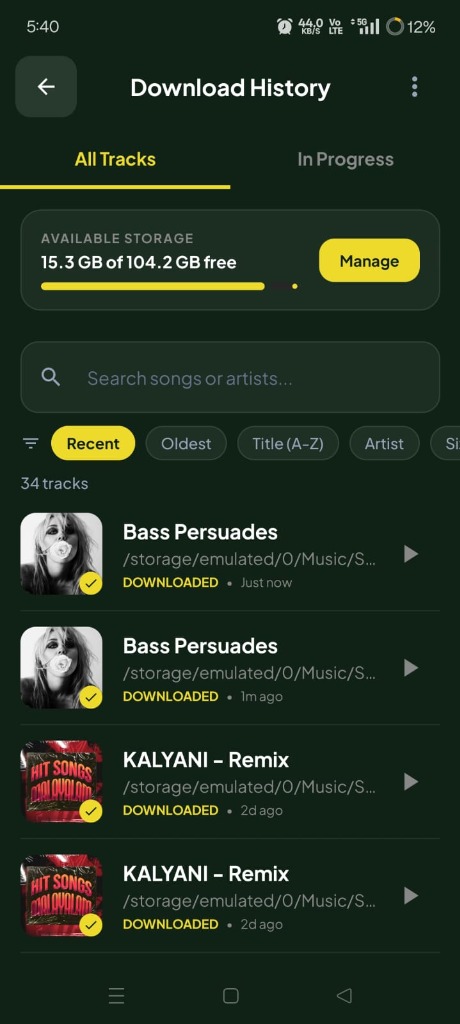
SpotSaver Download History and Storage Manager
🔍 Tap to Zoom
2. History & Library

Offline Music Library

Search, filter by artist/recent, and play all your saved tracks with integrated storage monitoring.

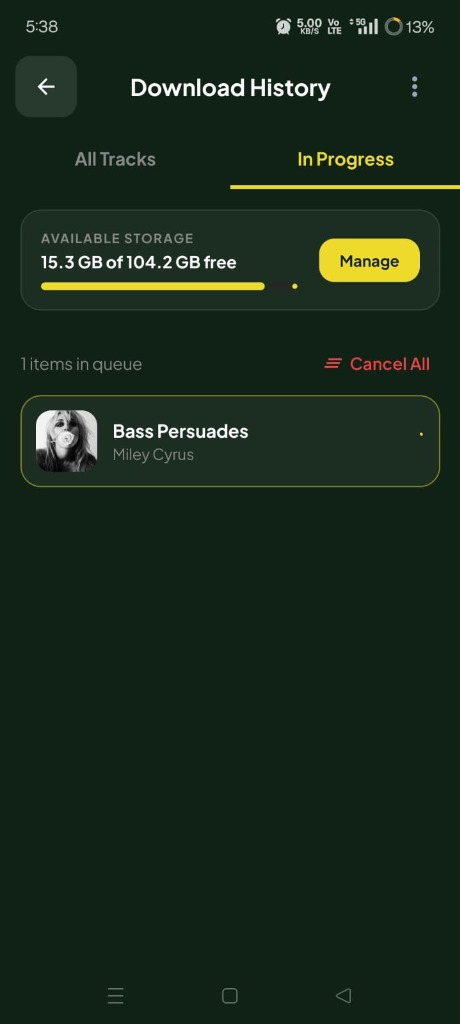
SpotSaver Active Download Queue & Storage Progress
🔍 Tap to Zoom
3. Live Queue

Background Progress

Monitor live downloading progress with smart queueing that prevents phone lag or battery drain.

🛡️
100% VirusTotal Clean 0/70 security engine flags, signed release
📂
Direct MP3 Storage Saves directly to /Music/ on your phone
🚫
Zero Ads & No Tracking No annoying ads, popups, or user surveillance
⚡
Batch Queue Engine Sequential download engine for full playlists

Why SpotSaver is the Best Spotify Music Downloader

Engineered specifically for Android music lovers who want fast, unrestricted Spotify song and playlist downloads.

🎶

Spotify Playlist Downloader

Batch download entire Spotify playlists or full artist albums in a single tap. Intelligent background queuing downloads tracks sequentially without lag.

🎧

True 320kbps MP3 Quality

Convert and save Spotify songs in authentic studio-quality 320kbps high bitrate MP3, preserving every instrument and vocal nuance.

🏷️

Automatic ID3 Tags & Art

Every downloaded track is automatically embedded with official metadata: track title, artist names, album name, release year, and HD album art.

📱

Built-In Offline Music Player

Play all downloaded music offline with lock screen controls, background playback, and seamless playback queues powered by Jetpack Media3.

🚫

Ad-Free Listening

Purchase SpotSaver on Gumroad for an ad-free standalone tool designed for personal offline listening.

🔒

No Spotify Account Needed

Download music without logging in or risking your Spotify account credentials. Clean, safe, and direct.

How to Download Spotify Music to MP3

Save any song or playlist in 3 easy steps.

1

Copy Spotify Link

Open Spotify, tap Share on any song, album, or playlist, and tap Copy Link.

2

Paste in SpotSaver

Open the SpotSaver app and tap Paste. SpotSaver instantly resolves the track list and artwork.

3

Download 320kbps MP3

Tap Download. Your MP3 files are automatically saved to your phone's Music/SpotSaver folder.

GET SPOTSAVER FOR ANDROID

Purchase SpotSaver for Android

Purchase on Gumroad, then follow the installation guide to get started on Android.

Version: v1.3.4 Standalone
File Size: 47 MB
Android: 7.0 and up
Purchase: Via Gumroad
Purchase on Gumroad
First time installing an APK? View 2-Minute Installation Guide →

Spotify Downloader FAQ

Everything you need to know about downloading Spotify music to MP3 on Android.

SpotSaver parses Spotify links (tracks, albums, playlists) and retrieves official metadata. It then extracts and converts high-fidelity audio streams into 320kbps MP3 files, tagging them with artist names and high-resolution album art for offline playback.
Yes! Paste any public Spotify playlist URL into SpotSaver, and tap Download All. The app queues every track in the background and saves them sequentially to your device.
Yes, 100%! SpotSaver contains no spyware, malware, or ads. Because it is distributed directly as an APK outside Google Play, Android displays a standard unknown source notice. Simply tap More details → Install anyway. See our Installation Guide for a visual tutorial.
All MP3 files are saved directly to your phone's standard Music/SpotSaver directory. You can listen inside SpotSaver or in any music player (Samsung Music, Poweramp, VLC, Apple Music, etc.).
No! SpotSaver works for all users without needing a Spotify Premium account or logging into Spotify.